Solarxy
A real-time 3D model viewer and visual debugger, in Rust.
An open-source desktop app with PBR rendering, split viewports, and inspection overlays, a terminal validator that runs the same checks in CI, and a browser app that adds node-based parametric modeling on the same Rust core. I designed the product, set the roadmap, and directed the build, with AI as the engineering team and years in 3D pipelines as the judgment that kept it honest.
- Role
- Creator, product and direction
- Timeline
- Nov 2025 to present
- Status
- v0.7.1, active
- License
- MIT
- Platforms
- macOS, Linux, Windows
- Role
- Solo creator: BA, product, direction
- Timeline
- Nov 2025 to present
- Status
- v0.7.1, actively developed
- License
- MIT, open source
- Platforms
- macOS, Linux, Windows, browser
- Stack
- Rust 2024, wgpu, egui, ratatui, React
Solarxy renders OBJ, STL, PLY, and glTF with a full PBR pipeline and a debugger's toolkit, then validates the same assets from the terminal so broken geometry never ships. One Rust codebase, three platforms, MIT licensed.
- One tool across the whole asset path: open and inspect locally, then gate the same checks in CI.
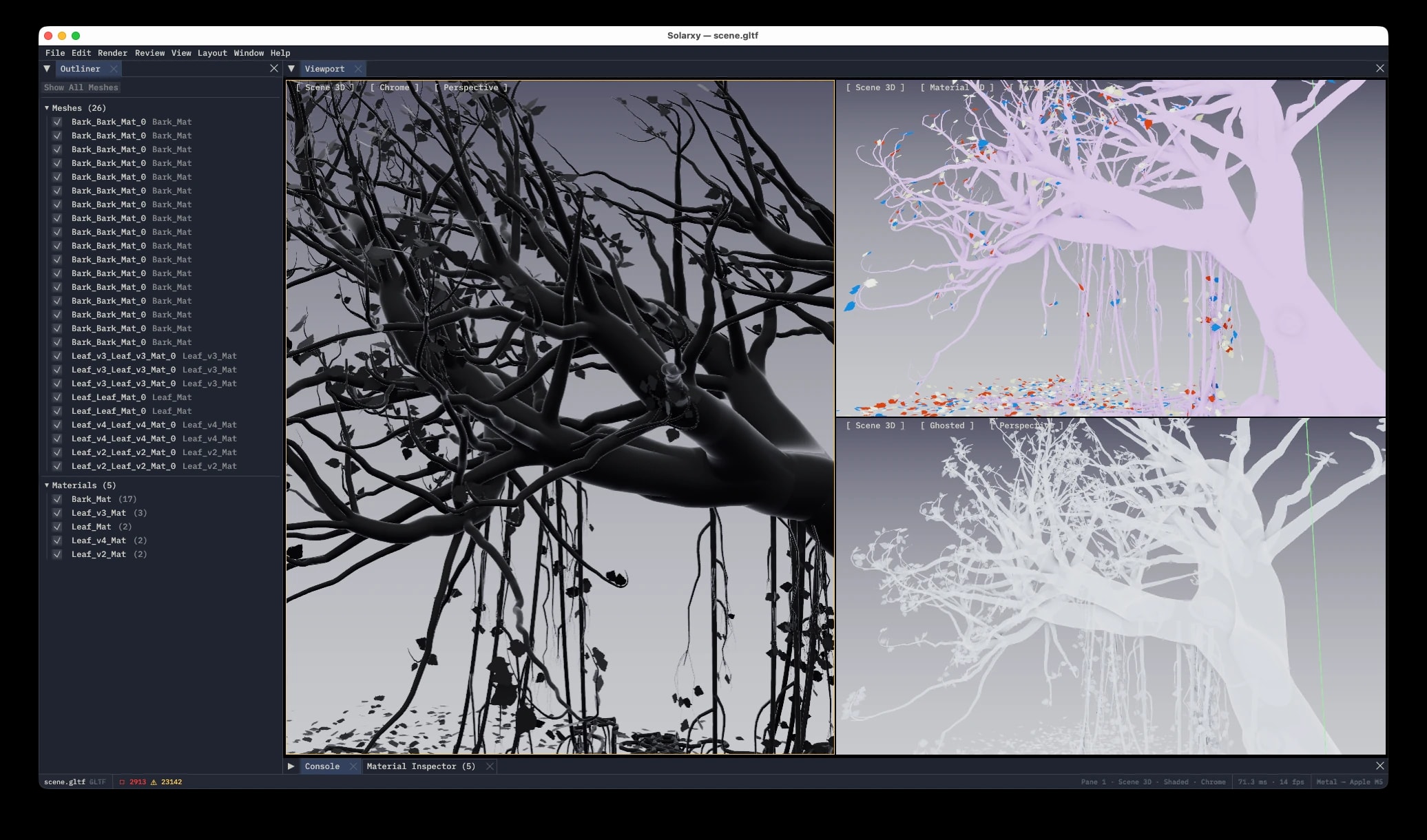
- Real-time PBR plus a debugger's overlays (UV overlap, texel density, overdraw, normals, validation) in one native window.
- Spatially-anchored review notes that persist beside the model and survive re-exports.
- Native installs on macOS, Linux, and Windows, and the same core compiled to WebAssembly for the browser: a 12-member Rust workspace plus a React front end, roughly 100,000 lines.
Why Solarxy
Anyone who has worked with 3D assets knows the friction. You receive or create a model and you need to check it. Are the normals right. Are the UVs present. Is the geometry clean. Is the silhouette correct. Over the years I built a lot of small visual checkers to answer those questions: shader overrides, normal checks, curvature views, written as MaxScript inside 3ds Max.
The problem is that those tools are locked inside the DCC, and not a cheap one. Every time I moved from 3ds Max to Houdini to Blender I rebuilt the same checkers from scratch in a different scripting language. I am still dragging ten-year-old MaxScripts onto every new machine. I wanted one tool that works the same regardless of which software made the model: a standalone viewer that renders it properly and tells me what is wrong with it. No DCC-specific scripting, no heavy suite to open for a quick look.
So I started building it. Solarxy is the tool I always wanted on the desk between receiving an asset and trusting it.
Own the inspection niche, not the modeling one.
Most 3D tools want to be everything. Solarxy was scoped, deliberately, around a single unglamorous question that technical artists and pipeline engineers ask dozens of times a day: is this asset actually correct?
It answers in two ways from one codebase. A real-time GUI viewer with PBR rendering and inspection overlays, and a terminal mode that emits machine-readable validation for CI. The positioning came out of a deep research pass, told explicitly not to benchmark against Blender, but against the lightweight tools artists actually reach for.
That produced a clean wedge. The existing options each do one half. Solarxy does both halves, viewing and validating, and adds the part none of them have: first-class CI integration.
F3D
fast viewer, CLI
- viewview: yes
- validatevalidate: no
- multi-formatmulti-format: yes
- CI-nativeCI-native: no
Marmoset Toolbag
paid seat, rendering
- viewview: yes
- validatevalidate: no
- multi-formatmulti-format: no
- CI-nativeCI-native: no
Khronos glTF Validator
validate only, glTF
- viewview: no
- validatevalidate: yes
- multi-formatmulti-format: no
- CI-nativeCI-native: partial
Solarxy
viewer plus analyzer, Rust, MIT
- viewview: yes
- validatevalidate: yes
- multi-formatmulti-format: yes
- CI-nativeCI-native: yes
The positioning was a deliberate choice: do both halves, integrate with CI, and stay out of the modeling fight.
What I built
Solarxy is not my day job; it is a personal project, built on nights and weekends. I find it valuable to switch sides from time to time and feel what it is like to be on every end of product development. In my day job I work with great teams. Here I am a team of one: I define the specs, shape the roadmap, direct the build, test it, deploy it, break things, fix them, ship. The full loop.
The product thinking came before the first line of Rust. I ran a proper needs assessment, weighed current state against future state, and built personas from research across open-source communities and my own years in 3D pipelines. That fed a deliberate, milestone-by-milestone roadmap to the current release.
The build itself was AI-first, and I want to be honest about what that means. AI did most of the typing; I owned the judgment. Years in computer graphics are what let me tell, within seconds, when an implementation was wrong, and the work that mattered most was the planning going in and the testing coming out. How that played out, role by role, is the next section.
Public releases
v0.1.0 to v0.7.1 in about eight months
Commits
first light in November 2025
Workspace members
acyclic graph, GPU-free core, wasm-clean where it must be
Validation checks
one report across viewer, terminal, and CI
Inspection modes
shaded through overdraw, one key each
Platforms
macOS, Linux, Windows
AI as the team
The interesting part of an AI-first build is not that code got written. It is how the role the AI played shifted across the project. Early on it was a graphics engineer. Then a Rust architect tearing apart a god-object. Then, as the product matured, a product manager and a business analyst deciding who it was even for. My job was to bring the domain judgment, write precise session briefs, review every change, and test on three operating systems.
Graphics Engineer
The first and longest-running role: turning a render loop into a real PBR pipeline and an inspection toolkit.
- Designed the multi-pass pipeline: shadow, main, floor, wireframe, grid, normals.
- Specced procedural IBL, SSAO from a G-buffer, and ACES tone mapping.
- Built the UV debug modes and the on-model inspection overlays.
Rust Architect
When the state file became a god-object, the role shifted to structure: decomposition, traits, and a clean workspace.
- Split one State struct into focused render, scene, post, debug, and input pieces.
- Planned the workspace extraction into six crates with clean boundaries.
- Swapped panics for proper error propagation and added unit-test coverage.
Product Manager
Once the engine was real, the question became sequencing: what ships in which milestone, and why.
- Wrote milestone specs with P0, P1, P2 priorities and acceptance criteria.
- Framed the 0.5 to 0.6 arc as Studio Adoption, one adoption test per feature.
- Flagged scope risks early and deferred features too complex for their release.
Business Analyst
The role that decided who Solarxy was even for, and which competitors it should ignore.
- Built six personas, three anti-personas, and a feature-priority matrix.
- Ran SWOT, Kano, and competitive analysis against the lightweight field.
- Defined the wedge: own the inspection niche, do not fight Blender.
Technical Writer
Documentation treated as a product surface, including a manual that ships inside the binary.
- Designed the in-app docs TUI: About, View, Analyze, Formats, Preferences.
- Wrote a multi-page wiki: architecture, CLI, validation reference, tutorials.
- Kept release notes and the README in sync across ten versions.
Release Engineer
The unglamorous role that makes a project installable: gates, signing channels, and package managers.
- Flagged the missing CI gate, no fmt, clippy, or test on main.
- Repaired cargo-dist and the release-candidate path.
- Bootstrapped the Homebrew and winget distribution channels.
A viewer and a debugger
Pretty PBR is only half the story. The real value is what happens when you peel an asset apart.
Real-time PBR rendering
A Cook-Torrance pipeline with image-based lighting, shadow mapping, SSAO, bloom, and selectable tone mapping. Drop in an HDRI and metallic surfaces start reacting to the environment. It is a real renderer that happens to fit in a small native app.
Split viewports
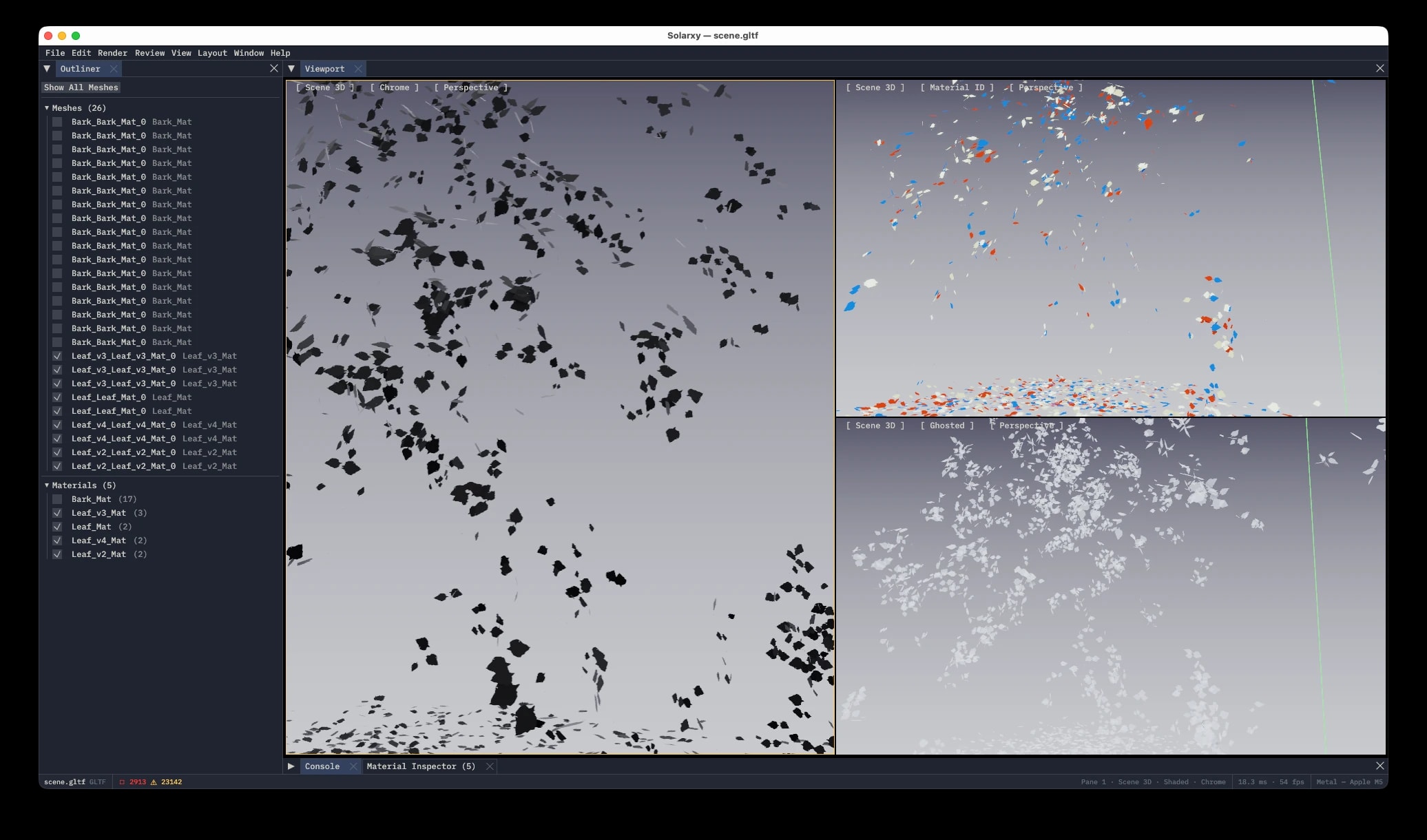
Divide the window into up to five layouts, each pane with its own camera and inspection mode. Study the UV islands on one side while you orbit the shaded model on the other. It is the view I always wanted when reviewing assets and never had in one lightweight tool.
Seven inspection modes
One keypress strips the model down to a single kind of information: shaded, material ID, UV map, texel-density heat map, depth, overdraw, and ambient-occlusion preview. The textures come off and the geometry tells the truth.
Clay and chrome overrides
Instantly swap to clay, dark chrome, or a matte silhouette. With reflections and textures gone, shadow falloff and surface curvature become the only information left, the way a sculptor reads a form.
UV and texel-density checks
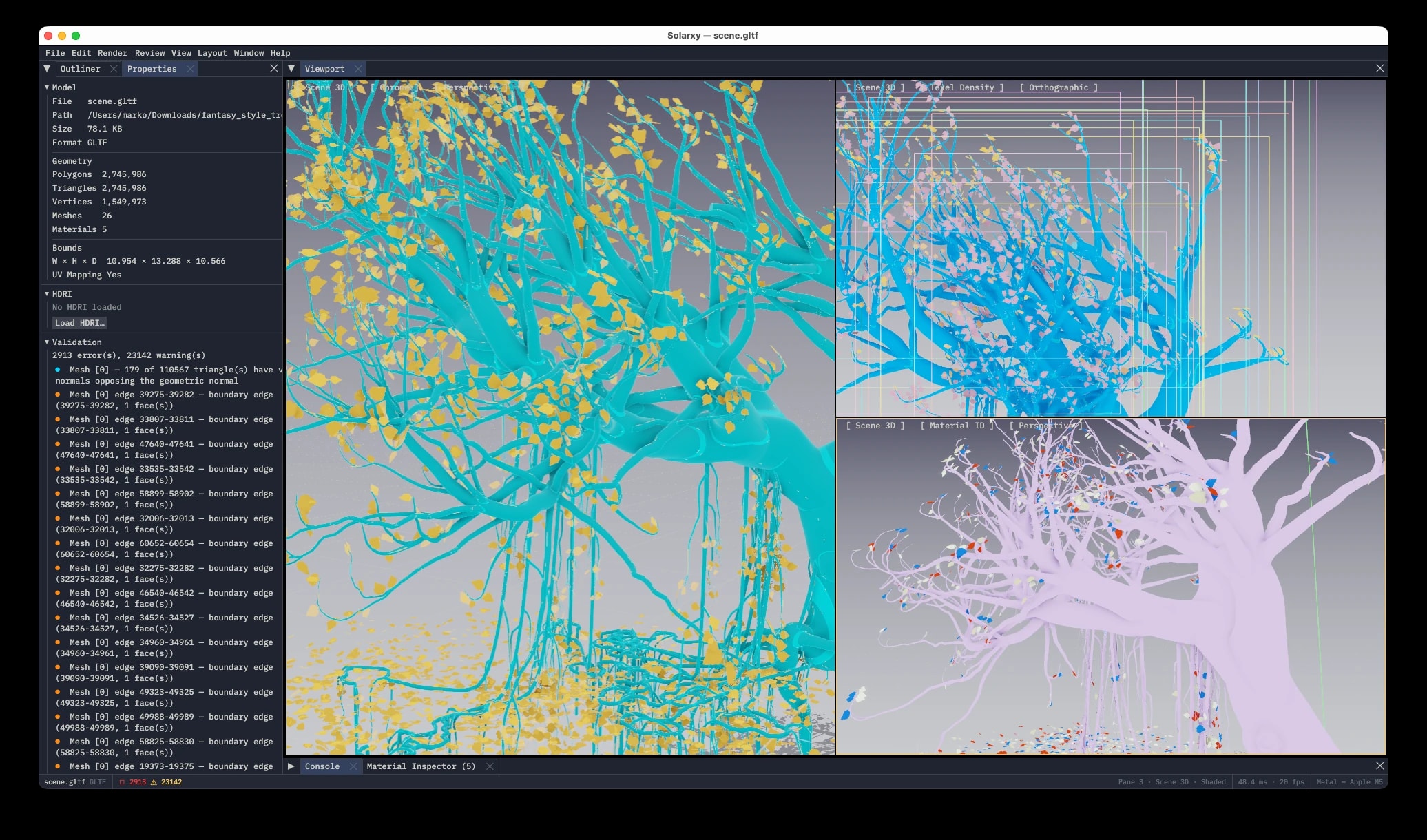
A built-in checker texture and a texel-density heat map surface stretched UVs, seams, and uneven resolution before they turn into texturing problems downstream.
Validation overlay
Toggle a color-coded overlay that highlights flipped normals, non-manifold edges, degenerate triangles, missing UVs, and over-budget meshes right on the model. Nine checks feed one report that the viewer, the terminal, and CI all share.
Review, right on the model
The biggest addition in v0.6.0, and the one that took the longest to build, is a way to leave feedback directly on the model. Most asset review still happens as screenshots with red circles drawn on them, separated from the asset and stale a few rounds later. Solarxy makes the note part of the model.
Press Shift+R, click anywhere on the surface, and type. Pick a category (info, warning, question, or change) and the note sticks to the exact spot you clicked, showing up as a colored pin on the model and as a row in a filterable Review Panel.
Saving writes a small .solarxy-review.json file next to the model, meant to live in version control beside the asset. A teammate opens the same model and the notes load on their own. Because a note is anchored to a precise triangle, a small re-export drops it back in the right place; if the geometry is rebuilt from scratch, Solarxy notices via a per-mesh fingerprint, dims the affected notes instead of losing them, and offers a one-click re-anchor.
Two deliberate choices: your name is attached only if you opt in, never pulled from your machine or your Git config, and the notes file is plain text, so two people editing it is just a normal merge.
The same core, in the browser
The 0.7 releases took the same Rust core and compiled it into the browser. Solarxy Web runs on WebGPU at solarxy.koljam.com: the viewer, the validator, and the review system, plus something the desktop app does not have yet, a full node-based parametric modeler. Nothing installs and nothing uploads; the engine and the renderer share one WASM instance inside the tab, so cooked geometry never even crosses into JavaScript.
Scenes save to a single .slxy file that carries every asset inside it, and the browser keeps an autosave ring in origin-private storage, so a closed tab costs nothing. Models arrive by dropping OBJ, STL, PLY, or glTF files, or whole folders, straight onto the app.
It shares this site's design language, too: the same warm palette drives the desktop app, the browser app, and the terminal UI from one definition in Rust.
Model with nodes
The graph is the scene. The root level holds the things a scene is made of, geometry containers, lights, and cameras, and you dive into a container to build the object inside it: primitives, transforms, mirrors, arrays, subdivision, merges, imports. Whichever node carries the display flag is what renders, so trying a variant is moving one flag, not rebuilding a stack.
Contexts are typed. Geometry, materials, and textures each live in their own kind of network, and networks reference each other by path instead of wire, so one material can drive any number of objects and one texture network can feed any number of materials without a single cable crossing the canvas.
Cameras are nodes too. Any viewport pane can look through one, locked so framing edits write back to the node as ordinary undoable parameter changes, and the split layouts put up to four panes with independent cameras, display modes, and inspection overlays side by side.
Textures, materials, review
Textures are cooked, not painted: constant, ramp, and noise generators feed adjust, filter, and composite nodes, with PBR utilities like ORM packing and height-to-normal conversion, and the texture viewer previews the published image live while the network recooks under your edits.
Materials get the same treatment: principled, matcap, toon, and unlit surfaces, mixed and assigned per mesh. And because it is still Solarxy, the whole inspection toolset came along: the validation checks, review notes anchored to geometry that survive recooks, and export nodes that tap the graph to write OBJ, STL, PLY, GLB, or PNG straight from the browser.
Fifty-eight nodes, one registry
Every node documents itself: the palette, the parameter panel, and this catalog all read the same registry snapshot the engine publishes, so none of them can drift from the code. These are the 58 types in v0.7.1, drawn with the same glyph art the app renders. Hover or tap any of them.
Box
boxPrimitivesA rectangular box centred on the origin, sized per axis and optionally divided into a grid of quads on each face.
Primitives
10Modifiers
25Lights
6Import
6Container
3Utility
8How it works
Solarxy is a 12-member Rust workspace, roughly 80,000 lines of Rust plus a 20,000-line React front end, with an acyclic dependency graph. The GPU-free core sits at the foundation, so the command-line tool validates assets headless without pulling in a graphics stack, and the same discipline is what let the web milestone compile the engine to WebAssembly: the node engine and the renderer never depend on each other, meeting only at a scene-delta contract in the core.
solarxy-app~12.7kThe desktop GUI: the winit and egui shell, the dockable workspace, sidebar, menu, input routing, and the viewport.
GPU / UIsolarxy-cli~1.9kThe terminal companion: the clap CLI, the ratatui analyze TUI, batch runs, and the self-updater.
CPU onlysolarxy-web~5.2kThe browser entrypoint: the wasm-bindgen boundary and the WebGPU host driving the same renderer.
GPU / UIsolarxy-renderer~16.5kAll wgpu state: pipelines, WGSL shaders, IBL, SSAO, bloom, shadows, composite, and the per-frame draw.
GPU / UIsolarxy-formats~2.1kOBJ, STL, PLY, and glTF loaders into one shared raw-model representation.
CPU onlysolarxy-validate~1.4kBatch validation and the CI adapters, with a stable library API for integrators.
CPU onlysolarxy-graph~25.1kThe headless studio core: the node-graph document, registry, cook engine, undo, and review.
CPU onlysolarxy-kernel~4.4kPure-CPU parametric geometry: the primitive generators, transform bake, and merge.
CPU onlysolarxy-imaging~0.7kPure-CPU image operators for the texture networks: adjust, composite, generate, filter.
CPU onlysolarxy-scenefile~1.2kThe .slxy scene format: a content-addressed ZIP with schema versioning and migration.
CPU onlysolarxy-core~8.5kPure CPU types: geometry, validation logic, preferences, report shapes, and the review sidecar.
CPU onlyNine checks, one report
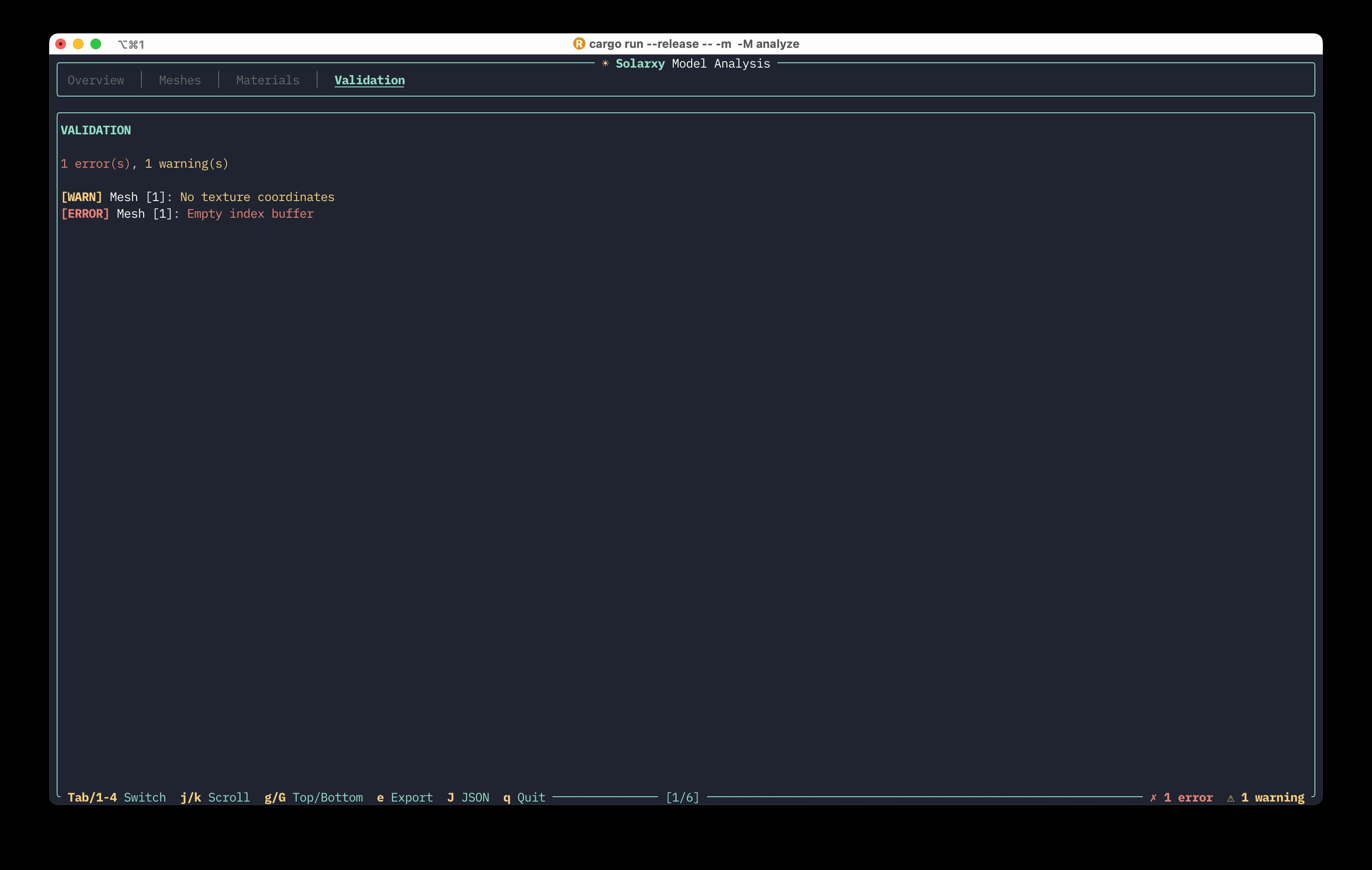
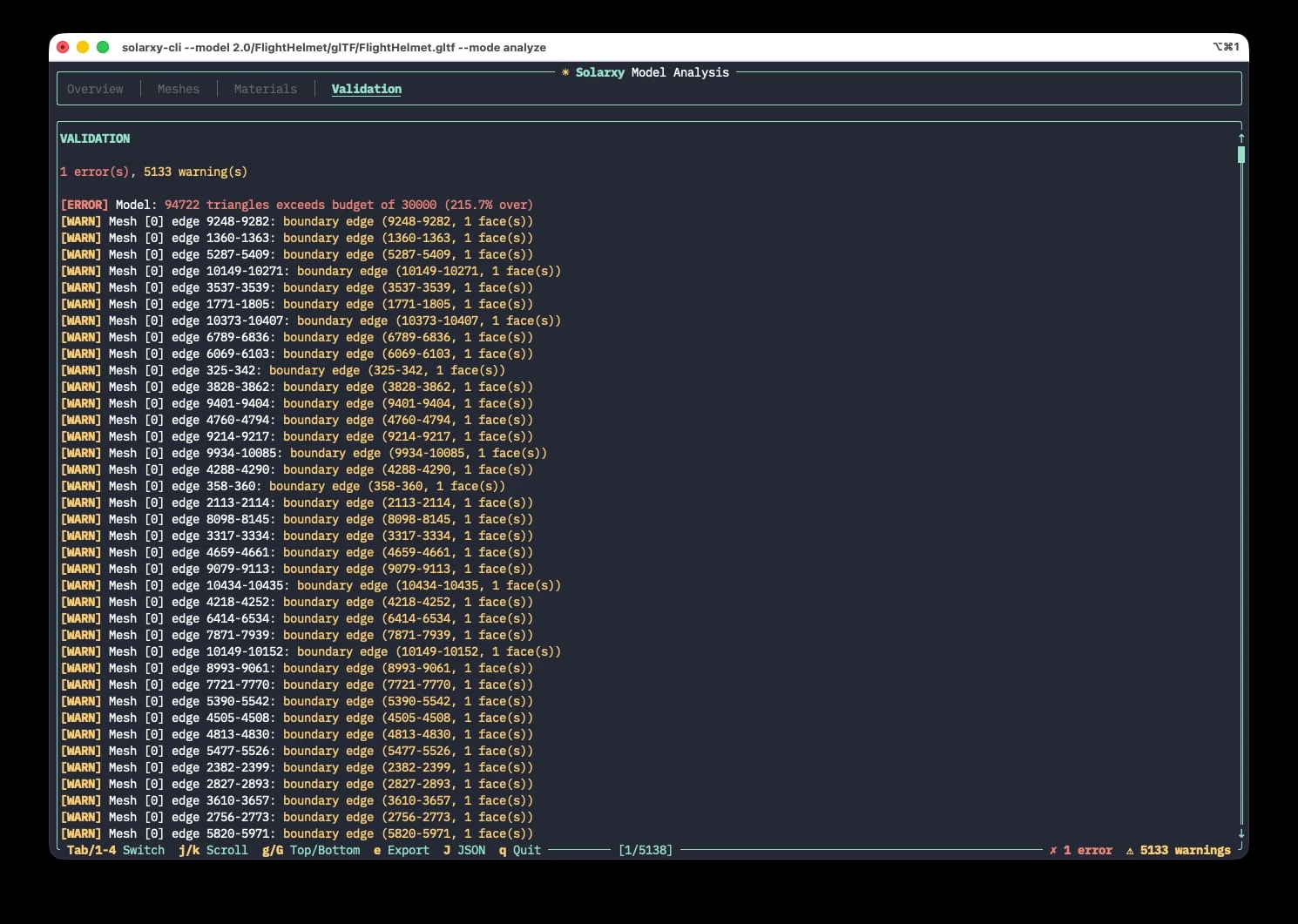
Nine checks share one report. That single report drives three surfaces: a color-coded overlay in the viewer, a four-tab terminal report, and a CI adapter that speaks SARIF, JUnit, and TAP.
normal_mismatchErrorPer-vertex normal count does not match the vertex count.flipped_normalsWarningAveraged vertex normals point against the winding direction.non_manifold_edgesError / WarningEdges shared by three or more triangles, or open boundary edges.triangle_budgetWarning / ErrorTriangle count over the category budget, past a tolerance band.degenerate_trianglesWarningNear-zero-area triangles.material_refsErrorA material index points past the material list.uv_presenceWarningMissing or mismatched UVs (OBJ and glTF).index_bufferErrorEmpty index buffer, or a count not divisible by three.allow_open_meshModifierOff by default; suppresses the boundary-edge warning.
The render pipeline
Each viewport pane runs a ten-stage render pipeline every frame. The review markers are painted on at the very end so they never z-fight the post-processing.
The same checks, in your pipeline
The same nine checks that light up the viewer also run with no window at all. From a terminal, solarxy-cli opens a model into a four-tab report, or validates a whole folder and returns a simple pass or fail, the way a unit test does. It speaks SARIF, JUnit, and TAP, so the result lands next to the rest of your checks in GitHub, GitLab, or Jenkins. Linting, for geometry.
solarxy-cli --mode analyze \
    --paths "assets/**/*.glb" \
    --config solarxy.toml \
    --adapter github-actions \
    --adapter-format sarif \
    --output report.sarif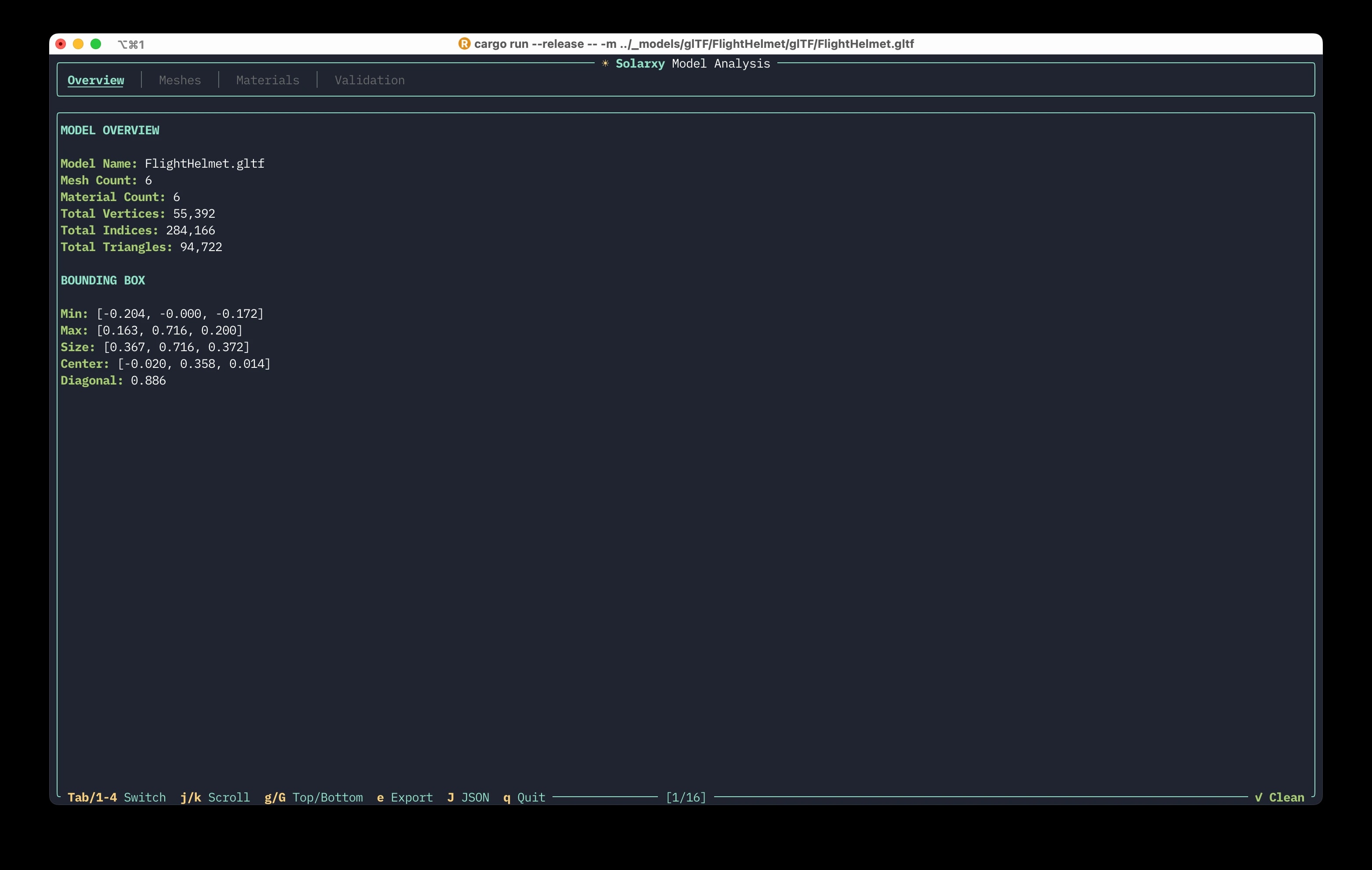
Six people the roadmap answers to
Before a single 0.4.0 issue was written, the research produced six personas and three anti-personas. Every milestone since has been pressure-tested against them; when a tempting idea served no one on the list, that was usually the signal to cut it.
Maya
Senior Technical Artist
Primary
- Pain today
- Long review queues, no standalone UV inspector, opening a heavy DCC just to check one model.
- With Solarxy
- Sub-second loads, UV, texel, and validation overlays, and spatial review notes to hand back to artists.
Daniel
Asset Pipeline Engineer
Primary
- Pain today
- Visual checks cannot be scripted, and no lightweight tool emits machine-readable validation.
- With Solarxy
- A CLI with a GitHub Actions adapter that emits SARIF straight into the pull request, in a 30-second setup.
Lena
Indie Game Developer
Primary
- Pain today
- No fast way to debug a rendering glitch or to learn UV mapping by sight.
- With Solarxy
- A tight visual loop: UV debug, a material inspector, and PBR isolated from engine noise.
Raj
3D Printing Hobbyist
Secondary
- Pain today
- Non-manifold edges and flipped normals quietly ruin prints and waste filament.
- With Solarxy
- The validation overlay flags geometry problems before the model ever reaches the slicer.
Alex
Rust Dev and OSS Contributor
Secondary
- Pain today
- Many graphics projects are impossible to build or test without a GPU and a tangled codebase.
- With Solarxy
- Core tests run without a GPU, six clean crates, and CI runs fmt, clippy, and test on every PR.
Prof. Chen
Computer-Graphics Educator
Secondary
- Pain today
- No free, lightweight, cross-platform tool for live visual teaching.
- With Solarxy
- Free and cross-platform, with UV and texel visuals that make abstract ideas concrete.
Weekly active inspections
Unique models loaded per week. Real utility, not vanity. Stars and downloads are leading indicators; this is the one that means the tool is genuinely in someone's daily loop.
Build the foundation
Get the renderer, formats, and inspection core solid and quiet. No launch, no noise, just a tool worth showing.
The screenshot moment
Inspection overlays and the split viewport make a single image that explains the whole product.
Pipeline adoption
The review system, configurable validation, and a 30-second CI setup turn individual interest into recurring team use.
From first light to the 1.0 line
Twelve public releases across eight months, then the road to 1.0. The spine fills as you scroll, solid where it shipped, hollow where it is still planned.
313 commits across eight months. A foundation laid quietly through late 2025, a January and February pause to rethink scope, a relentless cadence to v0.6.0, a June breather, and the web releases in July.
- originNov 2025
Genesis
The first wgpu render lifecycle and the first WGSL shaders. The engine, before anyone was watching.
Rust + wgpufirst render pass - v0.1.0Mar 2026
First Light
The first public tag: a Rust and wgpu engine with OBJ loading, Cook-Torrance PBR, an in-viewport HUD, and the analyze TUI.
Cook-Torrance PBROBJ loadinganalyze TUI - v0.2.0Apr 2026
Interactivity
Grid and gizmo, bounding box, turntable, bloom, background presets, settings persistence, and side-by-side compare, then a built-in docs TUI.
turntablebloomin-app docs - v0.3.0Apr 2026
Feature Baseline
Four operation modes, per-material PBR, procedural and HDRI image-based lighting, environment reflections, SSAO, and ACES tone mapping.
per-material PBRIBLSSAO - v0.4.0Apr 2026
Inspection Intelligence
The pivot from viewer to debugger: egui, split viewports, the inspection modes, the validation overlay, and the workspace split into crates.
eguisplit viewportworkspace extraction - v0.5.0Apr 2026
Two Binaries
GUI and CLI split into separate binaries, native installers, a Preferences dialog, and grouped sidebar controls.
GUI + CLInative installers - v0.6.0May 2026
Studio Adoption
Spatially-anchored review notes, dockable panels, a Material Inspector, overdraw and AO modes, configurable validation, CI adapters, and Homebrew plus winget.
review systemdockable panelsCI adapters - v0.7.0Jul 2026
Web Reach
The browser build, ahead of its target: Solarxy Web on WASM and WebGPU at solarxy.koljam.com, with node-based parametric modeling on the same Rust core, the .slxy scene format, and transform gizmos. The VS Code extension and glTF animation moved down the road.
browser buildnode graph.slxy format - v0.7.1Jul 2026
Contexts and Cameras
Typed material and texture networks take the catalogue to 58 documented node types; cameras become nodes you can look through; scenes export to OBJ, STL, PLY, and GLB; and one palette now drives the desktop, web, and terminal, in the same design language as this site.
58 node typescamerasone design language - 0.7.2Planned
Polish
Overall improvements: UI, UX, and functional polish across both shells.
polish - 0.8.0Planned
Open BIM
IFC import and Open BIM interoperability.
IFCOpen BIM - 1.0.0The horizon
The 1.0 line
Signed, web-reachable, and CI-native, with a stable solarxy-core on crates.io and a community around it.
1.0
A closer look
Challenges and learnings
Review markers that fought the renderer
My first marker pipeline was a WGSL signed-distance shader, and it z-fought with bloom, SSAO, and tone mapping. I re-painted the markers as an egui overlay drawn after the composite. The readability win was immediate, and I got text rendering and one-call clipping for free. The lesson: move UI affordances out of the HDR path when readability beats physical correctness.
GPU uniforms laid out by hand
The GPU uniform buffers are hand-laid #[repr(C)] structs with explicit 16-byte alignment and compile-time size assertions, so a shader can safely read a prefix of a uniform. Encoding the invariant in an assertion means a future field addition fails loudly at compile time instead of quietly corrupting a frame.
The integrated-GPU bug
For a while Solarxy was quietly running on the integrated GPU instead of the dedicated one, because the adapter was requested with the default power preference. It took a while to catch across machines and backends (Metal, DirectX 12, Vulkan), and it was a good reminder that the slow, subtle bugs are the expensive ones.
Rust and AI, honestly
I used Claude as a reviewed pair-programmer and found that Rust plays unusually well with AI tooling: the strict compiler, borrow checking, and Clippy are guardrails that keep both the human and the model honest. It struggled with ordering render passes and made the occasional rookie mistake, but it never got to fall down the unsafe-memory rabbit hole that C++ allows.
The stack
Rust for the strict compiler and toolchain, wgpu for one rendering codebase across Vulkan, Metal, and DirectX 12, and WGSL shaders with no cross-compilation.
The long version of this story, the why, the rendering core, and what AI-first development actually took, lives on the blog in two parts.
Open source, and yours to break.
Solarxy is free and MIT licensed. Throw your worst model files at it and tell me what breaks.